client-gallery-email-templates
Client Gallery Email Templates for Photographers

Client Gallery Email Templates for Photographers
A good gallery email does four jobs in under 200 words: it tells the client the photos are ready, gives them one clear link, explains how to view and download, and says what to do if something fails. Below are templates you can paste, adapt for an Indian wedding or event, and send. We have also covered the checks before sending and the follow-ups that come after. And since the email is only as good as the gallery behind it, we show how a single QR code can replace the pile of links that usually fills the inbox.
Its foreverSimplify Photo Gallery AccessGive clients and event guests an organized way to reach curated photo galleries, with instant uploads, AI face recognition, and QR code access.Visit
TL;DR
Every delivery email needs the gallery link, any password or PIN, a download instruction, the expiry date if there is one, and a line asking the client to reply if access fails.
Keep the link near the top. Clients who find it buried under paragraphs write back asking where the photos are.
For weddings, split delivery in two: a preview gallery first, the full set later, so the family has time to choose without being rushed.
Send one reminder about a week before expiry and one short check-in a few days after delivery.
If guests also want their photos, one QR code and face recognition save you from sending the same link to fifty people.
Table of Contents
What a client gallery email must contain
Template 1: the standard gallery delivery email
Template 2: the wedding delivery email
Template 3: the expiry reminder
Template 4: the “I cannot open it” reply
Template 5: the follow-up after delivery
Before you send: a short checklist
Fitting the template to the occasion
Protecting the gallery in the email
When one email is not enough: the guest problem
Perspective
Try it on your next event
Sources
What a client gallery email must contain
Start with the minimum. InspireFusion’s guide says a delivery email should carry the gallery link, any password or PIN, a short download instruction, the expiry date if there is one, and a line telling the client to reply if access fails.
The same guide lists the four details clients most often miss:
The password or PIN line gets buried.
The client tries to handle a large gallery entirely on a phone.
The expiry date is treated as optional.
The client does not know what “download” means, and some assume favouriting or screenshots are enough.
Each of these can be fixed with one plain sentence in your template. Put the PIN on its own line. Suggest a laptop for the full download. State the date, not “for a limited time”. And say in words that the download button saves the files to the device.
A guide on delivering professional galleries adds a few points worth including: say which download version is meant for digital use and which for printing, include any usage or licensing information, and avoid unrelated offers before the client has even seen the photos. Save the upsell for the follow-up.
Template 1: the standard gallery delivery email
Use this for portraits, family shoots, maternity, product and brand work. It is written for you to edit, so replace everything in square brackets.
Subject: Your photographs are ready, [Client Name]
Hi [Client Name],
Your photographs from [shoot or event] are ready. You can see them here:
Gallery link: [link] PIN: [PIN]
There are [number] photographs in total. Open the link, mark the ones you love with the heart, and use the download button to save the full set.
A few things that help:
Please download on a laptop if you can. It is faster and the files are large.
The gallery stays open until [date]. After that, the link will stop working.
If you want prints or an album, the options are inside the gallery.
Once downloaded, keep the files in two places, such as your laptop and a hard drive.
If anything does not open or download, just reply to this email and I will sort it out.
It was a pleasure photographing [one specific moment]. I hope you enjoy them.
[Your name]
This follows the pattern of the research-backed basics above, but the words are yours to change. The one specific memory in the last paragraph is worth keeping: bizai.guide recommends a short anticipation line, one remembered moment, a prominent link and a single low-pressure ask, all within about 220 words.
Template 2: the wedding delivery email
A wedding gallery goes to a couple, but it is opened by parents, cousins and friends from three cities. Your email has to work for the couple and also be easy to forward.
Subject: [Bride] and [Groom], your wedding photographs are here
Dear [Bride] and [Groom],
Your wedding gallery is ready. It begins with the [Haldi / Mehendi / Sangeet] and moves through to the [Pheras / Reception] in the order the day happened.
Gallery link: [link] PIN: [PIN]
This first gallery has [number] photographs in web size. Please look through them with your families and tap the heart on your favourites. Your album selection can be made from the same page.
The gallery is open until [date], so there is no need to rush. If your parents or relatives want to see it, you can forward this link. Here is a line you can use: “Our wedding photographs are ready, here is the link and the PIN.”
Your full-resolution files will follow once you have finished reviewing. If you need more time, write to me before [date] and I will extend it.
If anything does not open, reply here or message me on WhatsApp.
With warm wishes, [Your name]
The two-step approach is not just taste. One photographer’s delivery-system write-up describes a preview gallery in web resolution with a 14-day expiry, followed by a separate full-resolution package with a 30-day download window. It says weddings suit this because the longer window stops rushed decisions and download tracking shows how families share.
Another wedding workflow, from Tov Studio Photo, puts three things in the delivery email: the gallery link with password, a 60-second video walkthrough of the gallery, and a booking link for a viewing call within 14 days, with the couple asked to favourite their top 50 images beforehand. You can borrow any of those parts. A short walkthrough video is especially kind to older relatives who are not comfortable with galleries.

Set expectations about timing
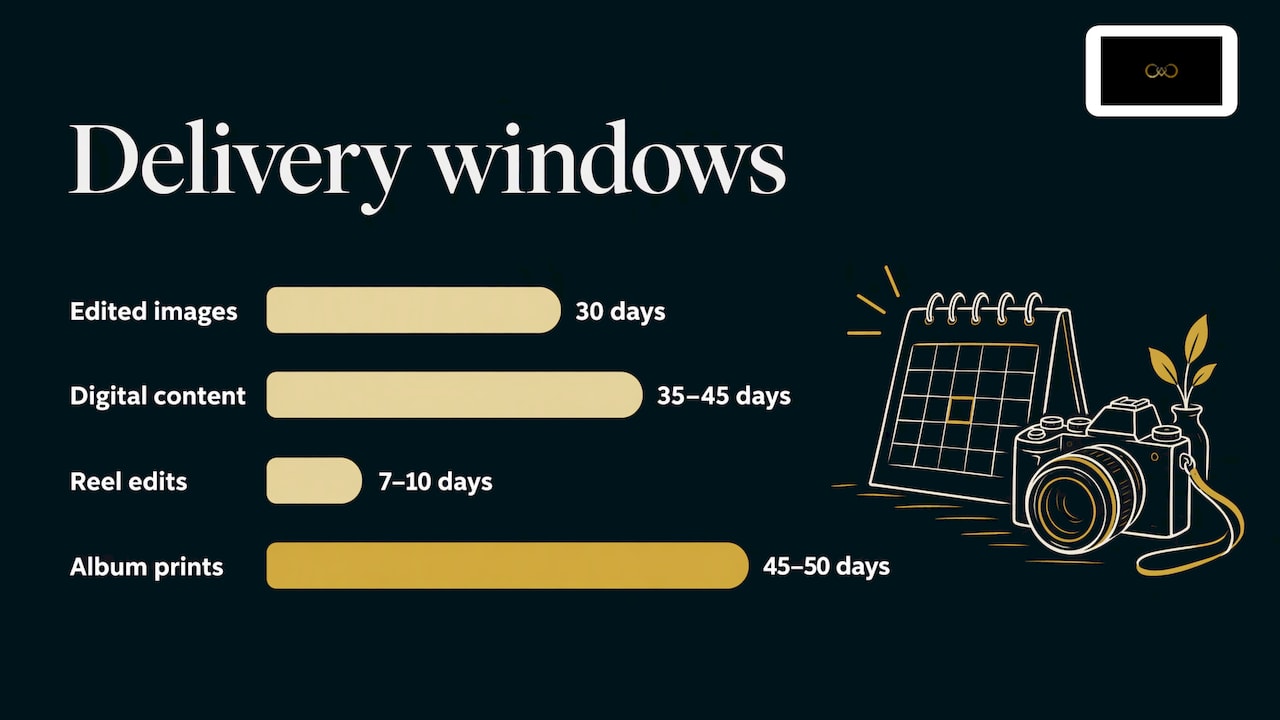
Indian couples often ask when the photographs will come, so say it in the contract and repeat it in your emails. One Kolkata studio’s contract guide describes a 35 to 45 day delivery period for digital content, with edited images in 30 days, reel edits in 7 to 10 days and album prints in 45 to 50 days. Your own timelines will differ. What matters is that the email names the stage the couple has reached: previews, full set, reels or album.
Template 3: the expiry reminder
A reminder is useful only once. Sent weekly, it turns into nagging. Veyra’s template guide suggests sending the expiry reminder about a week before the gallery closes, once, with an option to extend.
Subject: Your gallery closes on [date]
Hi [Client Name],
A quick note that your gallery will close on [date]. If you have not yet downloaded the full set, please do it before then: [link]
If you need more time, reply to this email and I will extend it.
[Your name]
Three lines are enough. Do not add a sales pitch here. The client is deciding about a deadline, not a purchase.
Template 4: the “I cannot open it” reply
This is the email nobody templates until the call comes at 10pm. Keep a ready reply. It should ask for as little as possible and solve the commonest causes first.
Subject: Re: Your photographs
Hi [Client Name],
Sorry for the trouble, let us get this sorted. Could you try these:
Copy the PIN exactly as written, without extra spaces.
Open the link in Chrome or Safari, not inside WhatsApp or another app.
If the download stops, try on a laptop and a stable Wi-Fi connection.
Check that your phone has enough free storage for the files.
If it still does not work, tell me what you see on the screen, or send a screenshot, and I will fix it or send the photographs another way.
[Your name]
These steps come from our own practical experience of how galleries behave on phones, not from a study. The principle behind them matches the research: clients struggle most with PINs and with downloading large sets on a phone, as InspireFusion notes.
Template 5: the follow-up after delivery
What you send after the gallery matters as much as the gallery email. Photo Pro’s workflow article describes a short follow-up three days after delivery that simply checks everything downloaded correctly, and notes that this is where clients often mention their next project.
Subject: Did everything download well?
Hi [Client Name],
Just checking that the gallery opened properly and all the files saved on your side. If you have already shared them with family, I would love to hear what they liked best.
When you are ready, I can help with prints or an album. No hurry at all.
[Your name]
A second view comes from bizai.guide: if the client has not opened the gallery after about 36 hours, a light “Did you see them yet?” is fine, and a print or album email on day 7 lands when the first excitement has settled and people start thinking about the wall.
Before you send: a short checklist
Most delivery problems are mistakes in the gallery, not in the email. The AaA Presets guide suggests this routine, which we have trimmed:
Open the gallery on a desktop and on a phone.
Check the cover photo and the order of the images.
Test the password or PIN yourself.
Download one file and open it to check size, filename and look.
Make sure no proofs, duplicates or unfinished edits are visible.
If you use favourites or print ordering, try them.
Check the expiry date.
On timing, bizai.guide advises against sending at 11pm just because editing finished. Schedule the email for the next morning. Veyra makes a related point: send the gallery when it is truly ready, rather than promising a minute and missing it.
Fitting the template to the occasion
Formed From Light recommends keeping separate variations for weddings, elopements, engagements, family, maternity and newborn sessions so each feels relevant. In practice you need a short list:
Occasion | What to change |
|---|---|
Wedding | Name the ceremonies, mention family forwarding, split preview and full delivery |
Pre-wedding shoot | Keep it short, link to the favourites feature |
Engagement or roka | Mention the family members who will want a copy |
Maternity or newborn | Softer tone, mention the album option |
Corporate event | Formal tone, usage and licensing line, no personal anecdote |
For wedding and event work, the guest question comes up quickly: “Can you send my photos too?” Our guides on wedding photo sharing and delivering event photos cover that workflow in detail.
Protecting the gallery in the email
If the gallery has a PIN, the email is the place where it can leak. Do not paste the PIN into a WhatsApp group the family already uses; send it to the couple and let them share it. For more on how access controls work, see our guides on password protected galleries, private photo galleries and secure client photo sharing.
If you show galleries on your own site as well, our note on how to embed a client gallery on your website explains the setup.
When one email is not enough: the guest problem
A delivery email suits one client. A wedding has hundreds of guests, and each wants the photos they are in. Sending separate links to each is the part that eats your week.
This is the problem It’s Forever Studio was built for. You upload instantly from the camera during the event, guests scan a single QR code with no app to install, and AI face recognition, tuned for Indian wedding lighting and large group shots, shows each guest their own photos. The gallery is branded to your studio, and guests can select album pages online. Your delivery email then needs one line: here is the QR code, share it with your guests.
Perspective
We built It’s Forever Studio after watching photo delivery turn into a pile of links, folders and WhatsApp forwards. A template helps, but a template cannot fix a delivery process that sends the client to five places.
Our view is simple. The email should be short because the experience behind it is simple. One QR code, no app for guests, a gallery with your branding, and privacy controls so the host decides who sees what. When that is in place, the couple gets the photographs, guests find their own pictures through face recognition, and you are not answering the same “where is the link?” message forty times.
There is a business side as well. Guests who browse the gallery can become your next enquiries through the WhatsApp-integrated lead generation, which means the delivery itself works as your best advertisement at a wedding.
Gowtham
Try it on your next event
It’s Forever Studio is built for photographers who deliver at Indian weddings and events. You pay for the online storage and the event duration you need, with no fixed plans or yearly subscriptions, and you can begin with a free trial. Start at It’s Forever Studio, or look at how QR code photo sharing and face recognition photo sharing work for weddings. If you want enquiries from guests, see lead generation for wedding photographers.

FAQ
How long should a gallery delivery email be?
Short enough that the link is visible without scrolling. One guide puts the target at under about 220 words, with the link prominent. Put instructions in a short list rather than long paragraphs.
Should I include the password in the same email as the link?
For most clients, yes, on its own line so it is not missed. For wedding galleries that families will forward, you can also share the PIN with the couple only and let them decide who else receives it.
What expiry period should I mention?
There is no standard. Examples in the research include a 90-day download window for a client gallery, and a 14-day preview with a 30-day full-resolution window for events. Choose a period you can honour, state the exact date, and offer an extension on request.
Should I add a sales offer to the delivery email?
Keep the first email focused on the photographs. Mention prints, albums or extra edits briefly, or save them for a follow-up a few days later, when the client has already enjoyed the gallery.
What if a client says the gallery will not open?
Reply quickly with a short list: check the PIN, open the link in a browser rather than inside a messaging app, use a laptop for large downloads, and ask for a screenshot if it still fails. Template 4 above is written for exactly this.
Sources
Client Gallery Delivery Email Template for Photographers, InspireFusion
Deliver a Pro Photography Gallery: Platforms, Setup and Email, AaA Presets
Write gallery delivery emails clients actually open, bizai.guide
Key Points in a Wedding Photography Contract, Howrah Photographer
Wedding Client Gallery Review and Selection Workflow, Tov Studio Photo
Recommended
Deliver photos to every guest — instantly.
Forever handles instant delivery, QR sharing, and face recognition — all in one place. Try it free.
Start for free →