live-event-photo-sharing
Live Event Photo Sharing: How It Works for Indian Weddings

Live Event Photo Sharing: How It Works for Indian Weddings
Live event photo sharing means photos reach your guests while the event is still happening, or within hours of it, through one gallery that opens from a single QR code. The photographer uploads from the camera, the gallery fills up, and guests scan, find themselves and save their pictures. No app, no chain of links, no waiting weeks. This guide explains how it works, how to set it up before the day, and what to think about on privacy.
Its foreverstudio.itsforever.inShare Wedding Photos Through One QR CodeIts Forever Studio helps photographers deliver curated event galleries with instant uploads, AI face recognition and QR code access for guests.Explore the photo sharing platform
TL;DR
Live sharing replaces many links and files with one gallery and one QR code that guests scan on their own phones.
Photos can be uploaded straight from the camera during the Haldi, Mehendi, Baraat and reception, so guests see them the same day.
Face recognition helps guests find their own photos in a large gallery, but it works best with good uploads and a clear selfie.
Set the gallery, branding and access rules before the event, not on the day.
Permission and privacy matter: decide who can view, download and share, and agree this with the client in writing.
Table of Contents
What live event photo sharing actually is
How it works, step by step
Face recognition: what it does well and where it needs help
Why a QR code works better than links and apps
What photographers gain from live sharing
Privacy, permission and access: decide before you share
A simple checklist for the week of the wedding
How it works with other types of events
Our perspective
Try live sharing at your next event
Sources
What live event photo sharing actually is
At most Indian weddings, photos travel in a messy way. The photographer sends a link to the family, someone forwards it to a WhatsApp group, a cousin asks for “the one where we are all together”, and a few weeks later a hard drive changes hands. Everyone is waiting, and nobody is sure they have seen every picture.
Live event photo sharing fixes this by putting every photo in one place from the start. There are three parts:
A gallery created for the event. It has a name, a cover, the studio’s branding and access rules.
Instant uploads. The photographer sends selected images from the camera or a laptop while the event runs.
A QR code. Guests scan it from a printed sign, a welcome board or the invitation, and the gallery opens in their phone browser.
This is different from a guest-upload album, where guests add their own phone photos. Here the photographer curates what is shown. That keeps quality high, protects the studio’s reputation and lets the studio decide what is shared and when.
How it works, step by step
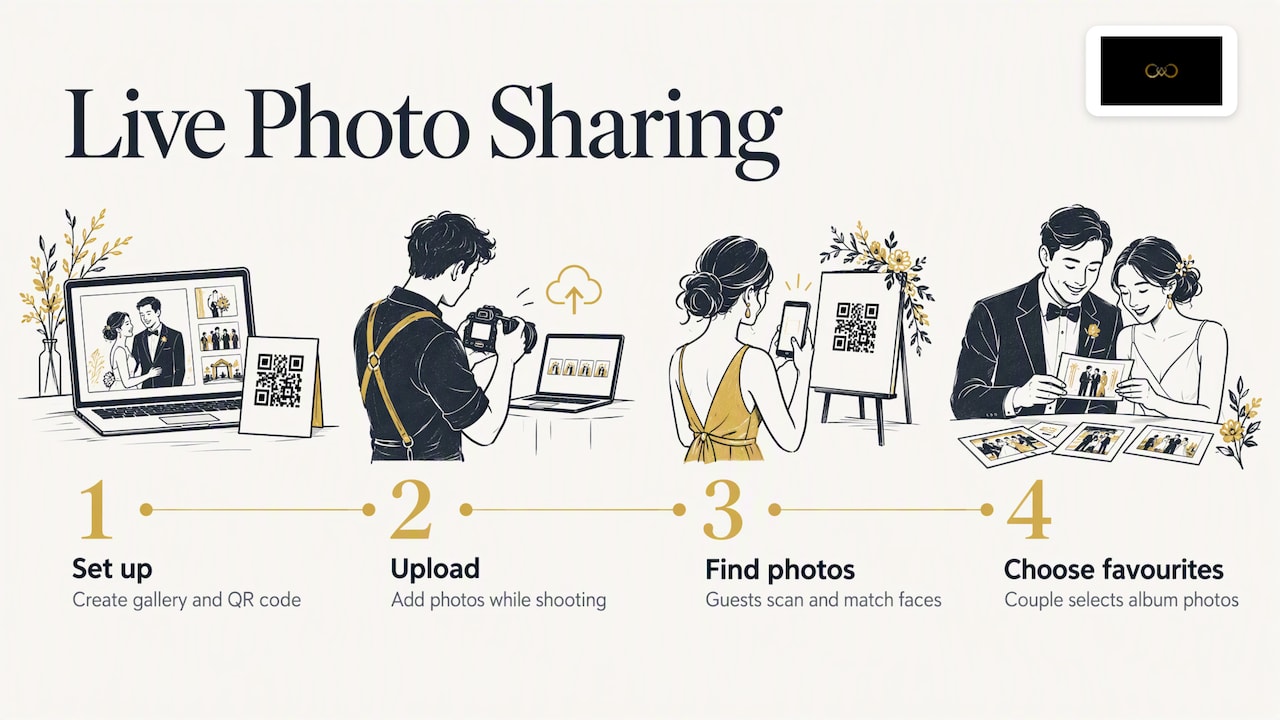
Before the event: create the gallery and the QR code
Set up the gallery a few days ahead. Name it clearly, add the couple’s names, choose a cover image and add your studio logo. Decide who gets access: everyone with the QR code, or only people you approve.
Then generate the QR code and plan where it will be seen. Our guide to event photo QR codes, signs and privacy covers placement in detail. A few places that work at Indian weddings:
the welcome board at the entrance of the venue
the registration or gifting desk
the table cards at the reception
the stage or the dining area, on a small standing sign
the digital invitation, if the family wants early access to the gallery link
Test the code on at least two different phones, one older and one newer, and on both mobile data and venue Wi-Fi. Wedding halls often have weak signal, so check this on the day of the walkthrough.
During the event: upload as you shoot
The point of live sharing is that you do not wait until the edit is finished. Many photographers send a small first batch within the first hour: a few portraits, the entry, the first rituals. Guests then have a reason to scan early, and the gallery grows as the day goes on.
A sensible rhythm for a long wedding:
Haldi and Mehendi: upload a first set of 20 to 30 best frames while the function is still on.
Baraat and ceremony: upload highlights between rituals, when you have a spare minute or an assistant is free.
Reception: upload group portraits and couple shots in batches, so guests can find them before they leave.
These numbers are a working suggestion from experience, not a rule. Choose a pace your team can keep up without missing the moments you were hired to capture. If you want a fuller picture of the whole delivery process, read our workflow for delivering event photos.
After the scan: guests find their photos
When a guest scans the code, the gallery opens in the browser. In a gallery of several hundred or thousand images, scrolling is slow, so most guests want a shortcut. That is where face recognition comes in: the guest takes a selfie, and the gallery shows photos in which they appear.
At a wedding with 400 guests, a gallery with only a plain grid means each person scrolls through everyone else’s pictures. With face recognition, an aunt who was photographed in six frames finds those six quickly and can save them straight away.
Face recognition: what it does well and where it needs help
Face recognition is the feature guests notice most, so it helps to be honest about how it behaves. We built our own version to cope with conditions that are common at Indian weddings: mixed warm and coloured lighting, dim halls, big groups, and heavy make-up, jewellery and dupattas. You can read more on our page about face recognition photo sharing for weddings.
To get the best results from any face matching tool:
Upload sharp, well-exposed frames. A blurred or very dark face is harder to match, whatever the software.
Ask guests for a clear selfie. Facing the light, no sunglasses, no heavy filter.
Include photos where faces are visible. Many beautiful candid shots show the back of a head. Those will not match anyone.
Keep a fallback. Some guests will prefer to browse by function, such as Haldi, Sangeet or Pheras. Organise the gallery into sections so they can.
Face matching is a convenience for finding photos. It should never be the only way into the gallery, and guests should always know why their selfie is being asked for. We come back to this under privacy below.
Why a QR code works better than links and apps
A guest at a wedding is dressed up, holding a plate, and not in the mood to install anything. A QR code works with the camera app that nearly every smartphone already has, so the step is small: point, tap, open.
Compare it with the usual alternatives:
Method | What the guest does | Common problem |
|---|---|---|
Many links sent on WhatsApp | Scroll chats to find the right link | Links get lost, forwarded to the wrong people |
Shared drive folder | Request access, sign in, download | Needs an account, slow with large files |
Dedicated app | Download, register, search | Many guests simply do not install it |
One QR gallery | Scan, open in browser | Needs a clear sign and reasonable signal |
A single gallery also means one place to update. If you add a new batch at night, everyone sees it without a new message. Our page on QR code photo sharing for weddings explains how this works in our studio tool.
If the family also wants a keepsake that collects guest messages alongside the photos, a wedding guest book with photos can sit next to the photographer’s gallery, since one shows the professional frames and the other holds guest memories.
What photographers gain from live sharing
Live sharing is not only a guest convenience. For a studio it changes the business in a few concrete ways.
Faster, calmer delivery
Clients often ask when their photos will arrive. If a first set is already in the gallery on the wedding night, that question is answered before it is asked. The final edited album can then follow on your usual schedule. For more on turning this into a repeatable routine, see our page on instant photo delivery for photographers.
A branded experience
When guests open a gallery with your logo, colours and name, every guest sees your work. Guests are often engaged or married themselves, or have a cousin getting married next year. A clean, branded gallery is a quiet introduction to your studio.
Leads that come from guests
Guests who like what they see may want to book you. A WhatsApp-linked enquiry button inside the gallery lets them reach you without searching for your number. We cover this on our page about lead generation for wedding photographers.
Online album selection
After the event, the couple can mark favourites for the printed album online instead of sending long lists of file numbers. This removes a lot of back and forth, and it keeps selections in the same place as the gallery.
Privacy, permission and access: decide before you share
Wedding photos show families, children and elders, often at private moments. A sensible set of rules protects the client, the guests and you.
Know the legal background
India has a law on digital personal data: the Digital Personal Data Protection Act, 2023. If you process guests’ images or selfies in a gallery, it is worth reading how the Act treats consent and personal data, and getting advice from a lawyer if you run a larger studio or handle corporate events.
On the general position of photography, one legal explainer notes that photographing in public is not restricted by law in India, while people in a private place have a reasonable expectation of privacy and can act if their images are misused. A wedding hall is usually a private space, so assume guests expect care.
Settle copyright and usage in your contract
The same source says copyright in professional wedding photos typically sits with the client who paid, unless the agreement assigns it to the photographer. Because of this, write down in your contract whether you may show images in your portfolio, on social media or in ads, and whether the family can restrict that. Do this before the event, not after a complaint.
Practical access controls
Choose who can open the gallery. Open to anyone with the QR code suits a large reception. A smaller family function may need an approval step or a password.
Control downloads. Decide if guests can download full-resolution images or only view and save web-sized ones.
Let the host hide sensitive images. Some photos, such as private moments in the bridal room, belong only to the couple and family.
Explain the selfie step. Tell guests what their selfie is used for. Our tool lets hosts manage guest access, and we encourage studios to say plainly what happens with face data.
Plan for removal requests. If a guest asks for a photo to be taken down, you should be able to do it quickly.
A short paragraph in your client agreement, plus a small line on the QR sign such as “Scan to find your photos. Your selfie is used only to match photos in this gallery”, handles most of this.
A simple checklist for the week of the wedding
Use this list in the final week:
Confirm with the family who may access the gallery and who may download.
Create the gallery, add branding and set the cover.
Build the function sections: Haldi, Mehendi, Sangeet, Baraat, Pheras, Reception.
Generate and print QR signs in a size readable from about a metre away.
Test the code and upload speed at the venue’s actual network.
Brief your second shooter or assistant on when and how to upload.
Prepare the first batch, so guests have something to see in the first hour.
Tell the family where the signs will be placed, so no sign is hidden behind a flower arrangement.
For a wider look at Indian wedding specifics, such as multi-day functions and large guest lists, our practical guide to wedding photo sharing goes further.
How it works with other types of events
The same method suits events beyond weddings: engagement parties, birthdays, corporate gatherings, college festivals and religious functions. The shape is identical. Create a gallery, share a QR code, upload during the event, and let guests find their own photos. What changes is the access rule. A corporate conference may need photos visible only to attendees, while a public festival may need a looser setting. Think about who the audience is, then choose the access rule that fits.
Our perspective
We built It’s Forever Studio because photo delivery was the part of wedding work that photographers dreaded most. The shooting is the craft. The sending, the chasing, the “please share the link again” messages are what eat evenings.
We think live sharing should be simple for three people at once: the photographer who uploads, the couple who want to relive the day, and the guest who just wants a picture of themselves with the bride. That is why we focus on instant uploads from the camera, a QR code that needs no app, and face recognition designed for the lighting and crowds of Indian weddings.
We also believe the gallery belongs to your brand, not ours. Your logo, your colours, your enquiry button. When a guest enjoys the experience, the credit goes to the photographer, and that is how referrals happen.
And privacy is part of the product, not an add-on. Hosts should decide who sees what, and guests should know how their selfie is used. Our tool is designed to give you those controls.
Gowtham
Try live sharing at your next event
If you are a photographer or studio that wants to deliver photos while the celebration is still going on, It’s Forever Studio gives you instant uploads, QR access for guests without an app, face recognition tuned for Indian weddings, branded galleries and privacy controls in one place. You pay for the storage and event duration you actually need, with no yearly subscription, and you can start with a free trial. See how it works on the It’s Forever Studio home page.

If you want to start with one feature, look at instant photo delivery for the upload workflow, or at face recognition photo sharing for the guest experience.
FAQ
Do guests need to install an app to see live event photos?
No. With a QR gallery, guests scan the code with their phone camera and the gallery opens in the browser. This is the main reason QR access suits weddings, where guests will not stop to install anything.
Can I share photos during the event if I am still shooting?
Yes, if you upload in small batches between key moments. Send a first set within the first hour, then add more at natural breaks. Keep your priority on the shots you were hired to capture, and use an assistant for uploads where you can.
What if the venue has poor internet?
Test the network at the walkthrough. If the signal is weak, consider a mobile hotspot for uploads and tell guests the gallery will fill up as photos sync. Guests can scan later from home and still see everything.
Is face recognition safe for guests’ privacy?
It should be used openly and with limits. Tell guests the selfie is used only to find their photos, let hosts control access, and agree the rules with your client in writing. For legal questions about personal data, speak to a lawyer familiar with India’s data protection rules.
Who owns the photos shared in a live gallery?
Under the general position described by a legal explainer on photography, wedding photos usually belong to the paying client unless the contract says otherwise. Put usage and portfolio rights in your agreement before the event.
Sources
Recommended
Deliver photos to every guest — instantly.
Forever handles instant delivery, QR sharing, and face recognition — all in one place. Try it free.
Start for free →